
Key Takeaways
- The right commercial door lock does more than keep people out. It controls who gets in, when, and with a full record of every entry that traditional keys can never provide.
- ANSI/BHMA Grade 1 hardware is the minimum standard for any Texarkana business entrance that sees daily foot traffic. Grade 3 hardware on a commercial entrance is a liability waiting to happen.
- Electronic access control eliminates the cost and hassle of rekeying every time an employee leaves. Credential revocation takes seconds from your phone without touching a single lock cylinder.
- Arkansas follows the IBC and IFC with local amendments, meaning your lock setup must meet free egress and ADA requirements or risk failed inspections and fines.
- Later in this guide, we break down exactly what access control installation costs in 2026 and what the professional installation process looks like from start to finish.
Your front door is either working for your business or working against it. There is no middle ground when it comes to commercial security in Texarkana, AR.
Mobile Locksmith Services provides commercial locksmith services across Texarkana and the surrounding southwest Arkansas region. Whether you need a fast commercial door lock replacement or a full access control system evaluated, having a trusted local expert matters when your business security needs to match the pace and complexity of one of Arkansas’s busiest commercial corridors.
Your Business Doors Are Either an Asset or a Liability
Most business owners do not think about their door hardware until something goes wrong: a break-in, a lockout, or a failed inspection. By that point, the cost is always higher than it would have been with a proactive upgrade. A well-chosen commercial door lock system does not just stop unauthorized entry. It gives you control, accountability, and peace of mind built directly into your building.
What Access Control Actually Does for Your Business
Access control is the system that determines who can open which doors, at what times, and under what conditions. It replaces the old model of physical keys with programmable credentials, including PIN codes, key fobs, smart cards, or mobile apps, and pairs those credentials with hardware that logs every single entry event. That audit trail alone is worth the investment for businesses in healthcare, retail, logistics, or any industry with compliance requirements.
Beyond security, access control is an operational tool. You can set schedules so the back door only unlocks during delivery hours, restrict server rooms to IT staff, and instantly revoke a former employee’s access without touching a single lock cylinder.
Why Traditional Keys Fall Short for Commercial Properties
Keys get copied, lost, and handed off without any record. When a keyed employee leaves your business, the only way to re-secure the property is to rekey every affected lock, a process that costs $50 to $150 per door and still cannot confirm whether copies were made. For a business with five exterior doors and fifteen employees, that math adds up fast. Electronic access control eliminates that vulnerability entirely.
Core Types of Commercial Door Locks
Commercial door locks are not one-size-fits-all. The right choice depends on your door type, traffic volume, security level needed, and whether you want the lock integrated into a larger access control platform. Here is a breakdown of the main hardware categories used in Texarkana commercial properties.
Cylindrical Lever Locks: The Standard Starting Point
Cylindrical lever locks are the most common commercial door lock type and a solid baseline for interior doors and lower-traffic secondary entrances. They install into a standard bore hole pattern, making them straightforward to retrofit into existing doors. For commercial use, look for cylindrical levers rated ANSI/BHMA Grade 1. The hardware is heavier, the latch bolt stronger, and the cycle rating significantly higher than residential versions. Brands like Schlage ND-Series and Corbin Russwin CL3300 are widely used in commercial builds throughout Arkansas.
Mortise Locks: Heavy-Duty Security for High-Traffic Doors
Mortise locks are the gold standard for main commercial entrances. The lock body is set into a pocket cut into the door edge, making the hardware far more resistant to forced entry than a cylindrical commercial door lock mounted on the surface. They handle high cycle counts without degrading, which matters on a retail storefront or office building entrance opened hundreds of times per day. Schlage L-Series and Yale 8800-Series mortise locks are common choices for Texarkana commercial properties that need maximum durability at the primary entry point.
Electronic Keypad and Smart Locks: Keyless Entry for Modern Businesses
Electronic keypad and smart locks bring access control functionality to individual doors without requiring a full wired network. They are ideal for small offices, storage rooms, or businesses making their first step into keyless access. PIN codes, RFID cards, and Bluetooth mobile credentials are the most common input types. The tradeoff is that standalone electronic locks typically do not provide real-time audit logs unless connected to a management platform.
Key features to look for in commercial-grade electronic locks include:
- ANSI/BHMA Grade 1 certification on the physical lock body
- Tamper alerts that notify you of forced entry attempts
- Fail-safe or fail-secure options depending on egress requirements
- Battery backup indicators with low-battery warnings before lockout risk
- Weather resistance ratings (IP65 or higher for exterior Texarkana installations given the humidity and summer heat)
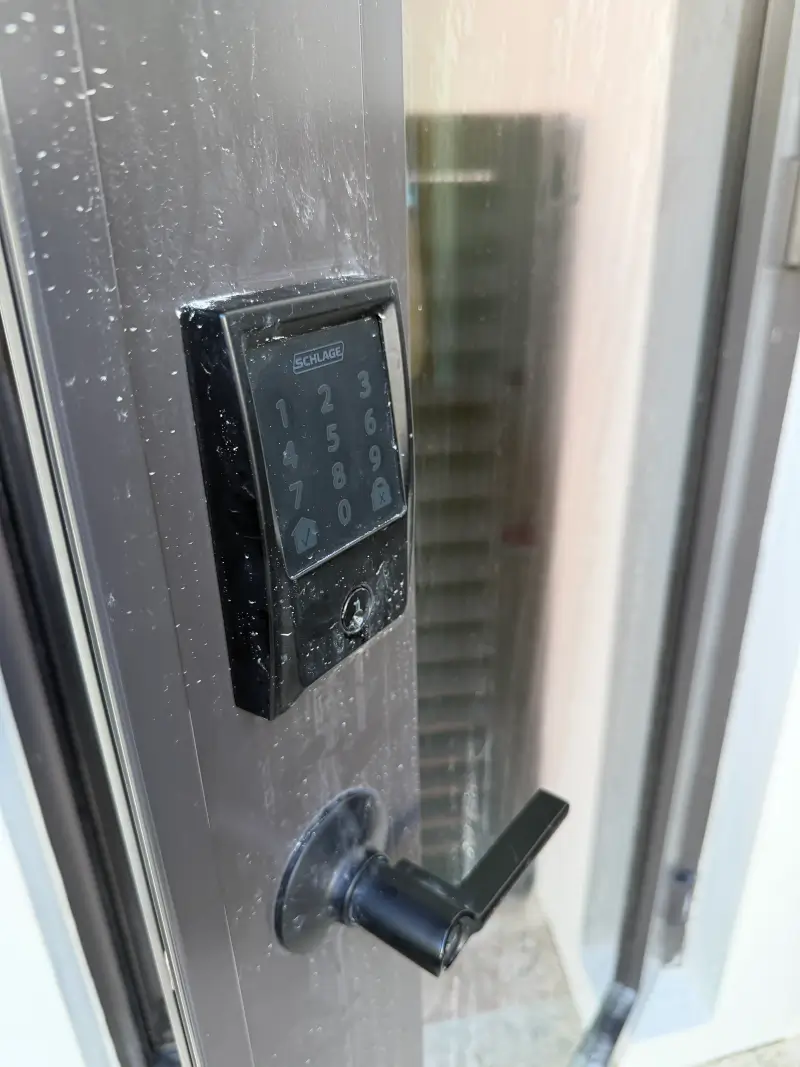
The Schlage NDE series offers wireless connectivity for integration into larger access control platforms without hardwiring every door, making it one of the most practical commercial door lock options for businesses retrofitting an existing Texarkana building.

Electrified Hardware: Electric Strikes and Magnetic Locks
Electric strikes and magnetic locks (maglocks) are the hardware layer that makes wired access control possible. An electric strike replaces the standard door strike plate and releases the latch when a valid credential is presented at the reader. A maglock uses an electromagnetic force, typically 600 to 1,200 pounds of holding force, to keep the door sealed until access is granted. Maglocks require careful code compliance review because they must be configured fail-safe on any door used as a fire egress path under Arkansas’s adopted IFC.
ANSI/BHMA Grade Ratings Explained
The ANSI/BHMA grading system tests lock hardware through millions of open/close cycles, impact resistance, and strike resistance. The grade assigned tells you directly how long the commercial door lock will hold up under real commercial use conditions. Understanding this rating is the fastest way to separate commercial-grade hardware from residential hardware that looks similar on the shelf.
Grade 1: The Right Choice for Most Texarkana Business Entrances
Grade 1 is the highest ANSI/BHMA rating and the minimum standard you should accept for any exterior commercial door or high-traffic interior door. Grade 1 commercial door locks are tested to withstand 250,000 open/close cycles and must pass a 360-pound door strike test. For a Texarkana retail store, office building, or warehouse, Grade 1 hardware is not an upgrade. It is the baseline.
The durability gap between Grade 1 and Grade 2 becomes obvious within the first two to three years of commercial use. Grade 1 hardware maintains smooth operation under daily abuse. Lower grades begin to bind, loosen, and fail at the latch mechanism.
Grade 2: Where It Works and Where It Does Not
Grade 2 locks are tested to 120,000 cycles and are appropriate for light commercial or residential applications. In a commercial context, they are acceptable for interior doors with low daily traffic, such as a private office, a storage closet, or a conference room used a few times per day. Using Grade 2 hardware on a main entrance or any door with significant foot traffic is a maintenance problem waiting to happen.
Why Grade 3 Has No Place in Commercial Settings
Grade 3 is residential hardware tested to only 80,000 cycles with lower impact resistance standards. Installing Grade 3 locks on a commercial property creates both a security vulnerability and a liability issue. If a break-in occurs and your insurance company discovers you installed below-standard hardware, your claim becomes significantly more difficult to defend.
ANSI/BHMA Commercial Door Lock Grade Comparison
| Grade | Cycle Rating | Strike Resistance | Best Application |
|---|---|---|---|
| Grade 1 | 250,000 cycles | 360 lbs | Commercial exterior and high-traffic interior doors |
| Grade 2 | 120,000 cycles | 250 lbs | Light commercial interior doors, low-traffic areas |
| Grade 3 | 80,000 cycles | 150 lbs | Residential only — not appropriate for commercial use |
When sourcing hardware for a Texarkana commercial project, always ask the supplier for the ANSI/BHMA grade certification documentation. Reputable manufacturers like Schlage, Corbin Russwin, Yale, and Allegion publish these ratings clearly. If a product does not list its grade, treat it as Grade 3 until proven otherwise. The grade of your lock is also directly tied to your insurance requirements. Some commercial property insurers in Arkansas specify Grade 1 hardware as a condition of coverage, particularly for businesses handling cash, controlled substances, or high-value inventory.
Access Control System Components
A complete access control system is made up of several layers working together. The credential reader at the door, the controller processing the decision, the commercial door lock hardware executing the command, and the software managing users and logs are all distinct components, and each one affects the performance and reliability of the whole system.
Credential Readers: Keypads, Key Fobs, and Mobile Access
The credential reader is the interface between your staff and the door. Keypad readers require a PIN and are the most affordable entry point but offer no individual identity tracking since multiple people may share a code. Proximity card and key fob readers use RFID technology and assign unique credentials per user, creating individual audit trails. Mobile access readers use Bluetooth Low Energy or NFC and allow employees to use their smartphones as credentials, increasingly common in newer Texarkana commercial builds and office retrofits.

Controllers and Software: The Brain Behind the System
The access control controller receives the credential signal from the reader, checks it against an authorization database, and sends the unlock command to the door hardware. Controllers range from single-door units ideal for small businesses to enterprise panels managing hundreds of doors across multiple buildings.
Cloud-based platforms like Brivo, Openpath, and Avigilon Alta have become dominant in the commercial market because they eliminate the need for on-site servers, allow remote management from any browser, and provide real-time alerts and audit logs accessible from a phone. On-premise systems like Lenel S2 or Software House C•CURE 9000 remain strong in enterprise environments where data sovereignty and offline operation are priorities.
Power Supplies and Backup Options
Every access control system needs a reliable power supply, and every exterior door on that system needs a plan for power loss. This is not a theoretical concern in Texarkana. Summer storms and grid fluctuations are real operational risks. Fail-safe locks release when power is lost and fail-secure locks remain locked. Egress doors that are fire-rated must be fail-safe under the IFC. High-security doors like server rooms may be designed fail-secure with manual override provisions.
Fail-Safe vs. Fail-Secure: What Happens on Power Loss
| Power Mode | Behavior on Power Loss | Code Requirement | Typical Application |
|---|---|---|---|
| Fail-Safe | Unlocks automatically | Required on fire egress paths (IFC) | Main exits, stairwell doors, fire-rated assemblies |
| Fail-Secure | Remains locked | Permitted on non-egress doors | Server rooms, secure storage, restricted interior areas |
Battery backup units and uninterruptible power supplies should be part of every commercial access control installation. A quality battery backup unit can maintain commercial door lock system operation for 4 to 8 hours during a power outage, covering most short-term grid disruptions. Proper power planning also includes surge protection on all controller panels. A direct lightning strike or nearby surge event can destroy an unprotected access control board, a replacement cost that a basic surge protector would have prevented.
Choosing the Right System for Your Texarkana Business
No two Texarkana businesses have identical security needs. A single-entrance office on State Line Avenue has a completely different threat profile than a multi-building manufacturing facility off Interstate 30. The right commercial door lock system is the one that matches your actual risk level, operational workflow, and budget.
Small Office vs. Large Multi-Door Commercial Properties
A small office with one or two entry points is a strong candidate for a standalone electronic commercial door lock system. Something like a Schlage NDE80 wireless lock or a keypad deadbolt with individual PIN codes per employee installs in a few hours, requires no low-voltage wiring, and gives you basic audit trail capability through a connected app. The jump to a networked access control system makes sense once you hit three or more controlled doors, have shift-based staff, or need to manage credentials remotely.
Larger commercial properties, including warehouses, medical offices, and multi-tenant buildings, need a centralized controller-based platform. At this scale, a cloud-based system like Brivo or Openpath becomes cost-effective because one management dashboard handles every door, every user, and every access event across the entire property.
Humidity and Weather Considerations in Texarkana AR
Texarkana sits in a climate zone that delivers high summer humidity, heavy rainfall, and occasional ice storms in winter. For any exterior commercial door lock, this means hardware rated for outdoor exposure. Look for credential readers with an IP65 rating minimum, confirming the unit is dust-tight and protected against water jets from any direction. Lock cylinders on exterior doors should use corrosion-resistant materials. Brass and stainless steel internals outperform zinc alloy components significantly in humid environments. Door closers should be specified with a temperature range appropriate for Arkansas summers, which regularly push past 95°F, as cheaper closers lose hydraulic fluid viscosity in extreme heat and begin slamming doors within one to two seasons.
Cloud-Based vs. On-Premise Access Control Platforms
Cloud-based access control platforms have become the default choice for small to mid-size Texarkana businesses because they eliminate the need for a local server, reduce IT overhead, and allow full remote management from any internet-connected device. Platforms like Brivo, Openpath, and Avigilon Alta charge a per-door monthly subscription fee, typically $3 to $10 per door per month, but include automatic software updates, remote unlock capability, and real-time mobile alerts.
On-premise systems store all access data on a local server you own and manage. They require more upfront investment but give you full data control with no dependency on internet connectivity or a third-party platform. For Texarkana businesses in healthcare or legal services where data handling policies are strict, an on-premise system may be the more defensible compliance choice.
How to Match Your Lock Hardware to Your Management Platform
Not all lock hardware communicates with all access control platforms, and this mismatch is one of the most common and expensive mistakes in commercial door lock installations. Before purchasing any hardware, confirm the reader and lock controller are on the approved hardware list for your chosen software platform.
- Wiegand protocol readers are the legacy standard and work with nearly all controller platforms, but offer limited data security
- OSDP (Open Supervised Device Protocol) readers provide encrypted communication between reader and controller and are the current industry best practice
- Wireless locks (Wi-Fi or Z-Wave) must match the frequency and protocol of your platform — confirm compatibility before installation, not after
- Mobile credential support requires both a BLE-compatible reader and a platform with a mobile credential provisioning system
- Third-party integrations like video surveillance, alarm systems, and HR software should be verified at the platform selection stage, not retrofitted later
Standardize on one platform first, then source the commercial door lock hardware. Buying mismatched hardware is a surprisingly common problem in commercial projects where hardware and software decisions are made by different people at different times. If you are retrofitting an existing building rather than starting from new construction, a wireless lock ecosystem like Allegion Schlage NDE or Salto XS4 One gives you access control functionality without cutting into walls for low-voltage wiring.
Arkansas Fire, Egress, and Building Code Requirements
Arkansas commercial door installations are governed by a layered set of codes that determine what hardware is legally permitted on each door type. Getting this wrong does not just mean a failed inspection. It can mean a locked door during a fire emergency, and that is a liability no business can afford. The Arkansas State Fire Marshal’s Office has statewide inspection authority over commercial properties and enforces egress compliance.
- Arkansas has adopted the 2021 International Building Code (IBC) and 2021 International Fire Code (IFC) as the state baseline
- The City of Texarkana, AR may enforce additional local amendments — always confirm with the local AHJ before beginning any commercial door lock installation
- New construction and significant renovation projects require permits and plan review before installation
- Existing buildings undergoing change of occupancy may trigger full code compliance upgrades on door hardware
The most critical code intersection for commercial door locks is egress. Any door used as a required means of egress must allow free passage from the inside at all times. No credential, no code, no special knowledge required. Electronic locks on egress paths must be fail-safe and must release immediately upon activation of the building fire alarm system.
Panic Hardware, Fail-Safe Locks, and Free Egress Rules
IBC Section 1010 governs door hardware on egress paths and is non-negotiable. Any door serving an occupancy of 50 or more persons must be equipped with panic hardware, a crash bar or touch pad device that releases the latch with a pushing force of 15 pounds or less applied in the direction of egress. Electronic locks on these doors must be wired to release automatically when the fire alarm activates and must be fail-safe on power loss. Delayed egress locks are permitted in specific occupancies but require alarm integration, signage, and AHJ approval.
ADA Compliance: Lever Hardware and Accessible Entry Standards
The 2010 ADA Standards for Accessible Design require that door hardware on accessible routes be operable with one hand without tight grasping, pinching, or twisting of the wrist. This effectively mandates lever handles over knobs on any ADA-compliant commercial door. Hardware must require no more than 5 pounds of force to operate the latch mechanism. Electronic locks with touchscreen-only interfaces may not meet ADA requirements if the interface requires precise touch input, so confirm accessibility compliance for any keypad or touchscreen reader installed on an accessible entrance.
How to Verify Compliance With the Local Authority Having Jurisdiction
The Authority Having Jurisdiction (AHJ) for commercial door hardware in Texarkana, AR is typically the local building department for construction-related permits and the fire marshal’s office for life safety compliance. Before finalizing any access control system design, submit your hardware specifications and door schedule to both offices for pre-approval. For existing buildings, schedule a voluntary compliance walk-through with the fire marshal’s office before beginning upgrades.
Texarkana’s position as a split-city also means that commercial properties near the state line should confirm their exact address falls under Arkansas jurisdiction before assuming which state or local code requirements apply. The Texarkana AR building department is the authoritative source for properties on the Arkansas side, and confirming your address jurisdiction before design begins prevents costly compliance surprises after installation.
Commercial Door Lock Code Requirements by Door Type
| Door Type | Required Hardware | Code Reference | Fail-Safe Required? |
|---|---|---|---|
| Main egress exit (50+ occupants) | Panic/crash bar hardware | IBC Section 1010.1.10 | Yes |
| Fire-rated stairwell door | Self-closing, positive-latching hardware | IBC Section 716 / IFC | Yes (if electrified) |
| Accessible entrance | Lever hardware, max 5 lb force | 2010 ADA Standards 404.2.7 | N/A |
| Interior restricted door (non-egress) | Electronic lock, any credential type | IBC Section 1010.1.9.8 | No (fail-secure permitted) |
| Delayed egress door | Listed delayed egress hardware plus alarm integration | IBC Section 1010.1.9.7 | Conditional |
Keep a copy of your door hardware schedule on file with your building documentation. Insurance audits, liability claims, and future renovation permits all benefit from clear records showing code-compliant commercial door lock hardware at each opening.
What Commercial Door Lock Installation Costs in 2026
Cost is one of the first questions any Texarkana business owner asks, and the honest answer is that it varies significantly based on door count, hardware grade, wiring requirements, and whether you need a permit-pulled installation with a licensed contractor.
Basic Mechanical Lock Replacement: $100 to $400 Per Door
A straight mechanical commercial door lock replacement, swapping out a failed or outdated cylindrical or mortise lock with a new Grade 1 equivalent, is the simplest and most affordable service. Hardware costs for a quality Grade 1 cylindrical lock like the Schlage ND-Series run $80 to $200 depending on function. Labor for a standard replacement on a pre-bored door runs $75 to $150 per door for a mobile locksmith call in the Texarkana area.
Mortise lock replacements cost more because the installation requires precise pocket alignment. Expect $150 to $300 for hardware plus $100 to $200 in labor. If you are rekeying rather than replacing, costs drop significantly. Professional rekeying typically runs $20 to $50 per cylinder, making it the most cost-effective option when existing hardware is Grade 1 and in good mechanical condition.
Commercial Door Lock Service Cost Breakdown
| Service Type | Hardware Cost | Labor Cost | Total Per Door (Estimate) |
|---|---|---|---|
| Rekeying existing lock | $0 to $10 (new pins) | $20 to $50 | $20 to $60 |
| Cylindrical lock replacement (Grade 1) | $80 to $200 | $75 to $150 | $155 to $350 |
| Mortise lock replacement (Grade 1) | $150 to $300 | $100 to $200 | $250 to $500 |
| Deadbolt addition (new installation) | $60 to $150 | $80 to $150 | $140 to $300 |
| Single-door keypad access control (installed) | $200 to $800 | $150 to $300 | $500 to $1,500 |
| Multi-door networked system (per door) | $500 to $1,500 | $300 to $1,000 | $800 to $2,500+ |
Enterprise Multi-Door Access Control: What to Budget
Multi-door networked access control systems are priced per door and include hardware, controller licensing, software setup, and installation labor. A realistic per-door installed cost for a wired commercial system in the Texarkana market runs $800 to $2,500 for a mid-tier platform like Brivo or Openpath, with enterprise systems running $2,000 to $5,000 or more per door fully installed. A five-door office installation on a cloud platform should be budgeted at $4,000 to $12,500 total depending on credential type, reader grade, and whether a dedicated panel room is needed.
Ongoing costs include cloud platform subscription fees ($3 to $10 per door per month), annual hardware maintenance agreements typically running 10 to 15% of hardware cost per year, and battery replacement in wireless lock systems. Factor these into your total cost of ownership, not just the upfront installation invoice.
Professional Installation: What the Process Looks Like
A properly executed commercial door lock and access control installation follows a defined sequence. Skipping steps, especially the assessment and testing phases, is where most problems originate. Here is what a professional installation covers from the first site visit to the final sign-off.
1. Site Survey and Door Assessment
Before any hardware is ordered, a qualified installer walks every door on the project and documents the door material, frame type, existing hardware, handing, door thickness, and any fire rating labels. This assessment determines which lock functions are required, whether existing prep holes are compatible with new hardware, and where power and data runs need to go. Skipping this step is the primary cause of wrong-hardware orders and change orders that inflate project costs.
2. Wiring, Power, and Connectivity Setup
For wired access control systems, low-voltage wiring runs from each door location back to the controller panel. All wiring in commercial spaces must be run in conduit or raceway where required by local electrical code. Power supply sizing is calculated based on the total current draw of all connected devices plus a 20% buffer. Each power supply should be on a dedicated circuit protected by a UPS or surge suppressor.
3. Hardware Mounting and Controller Configuration
With wiring in place, commercial door lock hardware is mounted and the access control controller is installed and connected. Electric strikes and maglocks are wired to the controller’s relay outputs and tested for correct fail-safe or fail-secure operation before any programming begins. The controller is then connected to the network and registered to the management platform.
4. User Programming, Permissions, and Schedule Setup
With the controller online and hardware confirmed communicating, the next step is building out the user database and permission structure. Every credential is assigned to a named user with a defined access level covering which doors they can open, during what time windows, and on which days. A well-structured permission matrix prevents the common mistake of giving all employees access to all commercial door locks by default.
Sample Access Permission Matrix for Texarkana Businesses
| User Role | Front Entry | Back Entry | Restricted Areas | Access Schedule |
|---|---|---|---|---|
| General Staff | ✓ | ✗ | ✗ | Business hours only |
| Shift Supervisor | ✓ | ✓ | ✗ | Extended hours |
| IT Staff | ✓ | ✓ | ✓ | 24/7 |
| Management | ✓ | ✓ | ✓ | 24/7 |
| Cleaning Crew | ✓ | ✗ | ✗ | After-hours window only |
Restricted Areas covers server rooms, secure storage, and management offices.
Access schedules are just as important as door permissions. A cleaning crew credential that works 24/7 is a security gap. It should only be valid during the specific after-hours window they are actually on site. Configure your platform’s holiday override schedule at installation time and establish a clear process for issuing temporary credentials to contractors or visitors. Most cloud platforms handle this through time-limited credentials that auto-expire — use this feature every time rather than issuing permanent credentials that require manual cleanup.
5. Testing Egress, Emergency Unlock, and Daily Function
No commercial access control installation is complete without a full operational test of every door in both the secured and emergency-release state. Each door should be tested for correct credential grant, credential denial, and alarm trigger response. The fire alarm integration, where all fail-safe locks release simultaneously on alarm activation, must be tested with the actual fire alarm panel, not simulated in the access control software. This test requires coordination with your fire alarm contractor and should be documented with a witnessed sign-off.
Common Installation Mistakes That Create Security and Safety Risks
Installing Non-Fail-Safe Locks on Critical Exit Paths
Installing a fail-secure commercial door lock on a fire egress door is the single most dangerous mistake in commercial access control. It means that during a power outage or fire alarm event, the door stays locked. This error typically happens when a product is ordered without confirming the fail mode, or when a fail-secure lock is repurposed from a non-egress application to an egress door during a project scope change. Always verify the fail mode of every electrified lock before it goes on a door, and cross-reference it against the door’s egress designation on the door schedule.
Skipping Door Force and Speed Testing After Installation
A door closer adjusted too tightly will slam the door shut faster than the electric strike can re-lock, causing repeated latch-bolt strike misalignments that wear out the strike plate within months. A door closer adjusted too loosely allows the door to drift open without latching, defeating the commercial door lock entirely. Both scenarios are discovered immediately with a five-minute post-installation test and almost never caught without one.
Poor Maintenance Schedules That Lead to Binding Doors
Commercial door hardware has a finite service life that is dramatically shortened by neglect. Hinges lose lubrication and begin to bind. Closer hydraulic fluid degrades in Texarkana’s summer heat, causing inconsistent closing speed. Battery-powered wireless locks run low and begin producing intermittent failures before dying completely, often at the worst possible moment.
A basic commercial door hardware maintenance schedule should include quarterly hinge lubrication with a dry lubricant, annual closer adjustment and inspection, annual battery replacement in all wireless locks, and a semi-annual full-function test of every credential reader, electric strike, and emergency release function. Document each maintenance visit and keep records on file.
Mobile Locksmith Services in Texarkana, AR
Mobile Locksmith Services operates throughout the Texarkana, AR area providing fast, on-site locksmith solutions for commercial properties of all sizes, from single-door office commercial door lock replacements to emergency after-hours lockout response. Having a trusted mobile locksmith on call is a practical business continuity tool, not just an emergency backup.
When to Call a Mobile Locksmith vs. a Full Access Control Installer
A mobile locksmith is the right call for mechanical lock issues, rekeying, commercial door lock replacements, master key system setup, emergency lockouts, and single-door electronic lock installations. These services are fast, typically completed in one visit, and do not require permitting for most standard hardware swaps. For more on what to do when a commercial property is completely inaccessible, our commercial lockout guide covers the immediate steps in detail.
A full access control installer is the right call when you are wiring multiple doors into a centralized controller, integrating with a fire alarm or video surveillance system, or installing hardware on a new construction project that requires permit-pulled low-voltage wiring.
Emergency Lock Repairs and After-Hours Response
Commercial lockouts do not happen during business hours by design. A broken key in the front door cylinder, a failed electronic lock battery, a jammed latch on closing night. These situations require fast response at any hour. Our 24/7 emergency locksmith service can reach most Texarkana commercial addresses quickly, diagnose the failure on site, and resolve the issue with stock hardware carried in the service vehicle.
Rekeying, Master Key Systems, and Lock Upgrades on the Spot
Rekeying is the most underutilized commercial security service. Any time an employee with key access leaves your business under any circumstances, rekeying the affected cylinders is the minimum required security response. Our Texarkana technicians regularly find Grade 3 residential hardware on main commercial entrances, particularly in older downtown properties where the original commercial door lock was replaced quickly without anyone verifying the grade rating on the replacement hardware.
Master key systems are a practical upgrade for Texarkana businesses with multiple key holders and multiple access zones. A well-designed master key system allows each employee to carry one key that opens only their authorized doors, while a grandmaster key opens everything. A mobile locksmith can design, cut, and install a master key system on site for most standard commercial lock lines including Schlage, Kwikset commercial, and Corbin Russwin.
The Right System Turns Your Doors Into a Business Tool
The businesses that get the most out of commercial access control treat it as an operational system rather than just a security expense. When your commercial door locks log every entry, your credentials expire automatically, your fire egress is code-compliant, and your mobile locksmith is a phone call away for any mechanical issue, your door hardware is actively working for your business every single day.
Start with the right grade of hardware, match it to the right platform, and get the installation done correctly the first time. That combination is what separates a system that actually protects your business from one that just looks like it does.
Need Commercial Door Lock Service in Texarkana?
Mobile Locksmith Services comes to your property anywhere in the Texarkana AR area. From Grade 1 lock upgrades to access control installation and 24/7 emergency response, we handle it all on-site.
Call us now: (870) 361-8990
Frequently Asked Questions
These are the questions Texarkana business owners ask most often when evaluating commercial door lock upgrades and access control systems.
What Is the Best Commercial Door Lock for a Small Business in Texarkana, AR?
For most small Texarkana businesses with one to two entry points, start with an ANSI/BHMA Grade 1 cylindrical or mortise lock paired with a standalone electronic keypad. The Schlage NDE80 wireless lock installs on a standard door prep, connects to the Allegion cloud platform via Wi-Fi, and requires no low-voltage wiring.
Do I Need a Permit to Install an Access Control System in Arkansas?
It depends on scope. Replacing a mechanical commercial door lock like-for-like typically requires no permit. Installing new low-voltage wiring for access control usually requires an electrical permit in Arkansas. Confirm with the Texarkana AR building department before beginning any wired installation.
What Happens to My Electronic Locks During a Power Outage?
It depends on how your locks are configured. Fail-safe locks unlock automatically on power loss, required on fire egress doors. Fail-secure locks remain locked, appropriate for server rooms. Battery backup units can maintain commercial door lock system operation for 4 to 8 hours during most outages.
| Lock Type | Power Loss Behavior | Backup Option | Recommended Application |
|---|---|---|---|
| Fail-Safe Electric Strike | Releases (unlocks) | Yes, via battery backup unit | All fire egress doors |
| Fail-Secure Electric Strike | Remains locked | Yes, via battery backup unit | Server rooms, secure storage |
| Maglock (Fail-Safe) | Releases (unlocks) | Yes, via battery backup unit | Vestibule and egress-path doors |
| Wireless Standalone Lock | Operates on internal batteries | Built-in (AA batteries) | Single-door office, storage room |
| Wired Networked Lock | Depends on fail mode setting | Via system UPS or battery backup | Multi-door networked installations |
How Often Should Commercial Door Locks Be Serviced or Inspected?
High-traffic commercial doors should be inspected quarterly. Lower-traffic interior doors need semi-annual inspection. Annual full-system testing, including fire alarm integration and battery replacement in all wireless devices, should be a fixed item on your facilities calendar regardless of door traffic volume.
Can a Mobile Locksmith Install a Full Access Control System for My Business?
Yes, for single-door and small multi-door wireless commercial door lock systems. Platforms like Allegion Schlage Engage require no low-voltage wiring, so installation falls within standard commercial locksmith capabilities. Larger wired systems may require a licensed low-voltage contractor for conduit and termination work.

